Personal finance · Powered by Insight Nexus AI

Your money.
One clear view.

Your bank shows you a list. Your card shows you another one. Insight Wallet pulls it into a single picture, sorts every transaction, and shows you what actually changed this month — starting before you connect anything.

Free forever tier No bank connection needed Encrypted at rest Cancel anytime
The Insight Wallet dashboard showing a total balance, a vacation savings goal at 22 percent, and recent transactions automatically categorized as Paycheck, Electric and Gas.

What you get

Everything sorts itself.
You just look.

No spreadsheets, no manual tagging, no evening spent reconciling a credit card statement.

Start with a statement

Drop in a PDF or CSV from your bank and every transaction lands sorted. No login to your bank, no waiting on a connection to approve.

Categories that learn

Correct a category once and it sticks. Next month's charge from the same place arrives already filed, even when your bank spells it differently.

Real numbers, plainly said

Where the money went, what changed since last month, and by how much. Specific figures, never "you spent more than usual".

Subscriptions surface themselves

Recurring charges are spotted from your own history and shown in one list. You cancel what you want, and you keep every dollar you save.

Budgets and goals that track

Set a monthly limit or a savings target and watch it fill as real transactions land. Alerts arrive before you blow past a limit, not after.

Two people, one set of books

Share an account with a partner on Wealth. Two separate logins, the same picture of the money, and neither of you can touch the other's password.

How it works

Three steps.
About four minutes.

STEP 01

Upload or connect

Start with a statement PDF or CSV on the free plan. Or connect your bank on a paid plan and let transactions arrive on their own.

STEP 02

It sorts itself

Merchants are recognised, amounts are normalised, and every line is categorized. Anything uncertain is flagged for a glance rather than guessed at.

STEP 03

See what changed

Spending by category, cash flow month to month, net worth, and the subscriptions quietly renewing in the background.

Reports

Where it actually went.

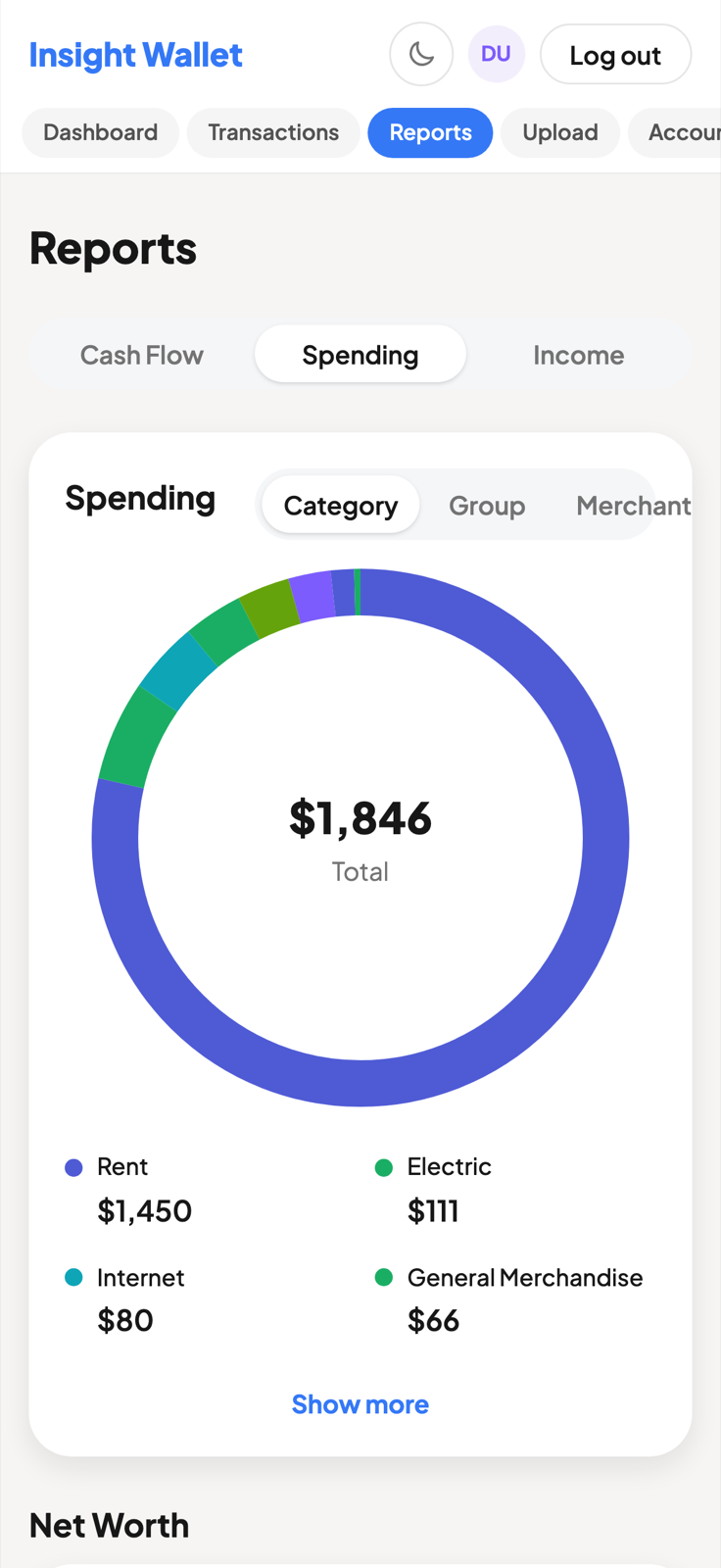
Spending by category, by merchant or by group. Cash flow across months. Net worth with assets and liabilities separated, so a big number never hides a bigger debt.

  • Category, merchant and group breakdowns
  • Month-by-month cash flow
  • Net worth, assets and liabilities apart
  • Transfers excluded, so totals aren't inflated
The reports screen showing a spending donut chart totalling $1,846 broken down by Rent, Electric, Internet and General Merchandise, beside a net worth card reading $66,256.

Transactions

Named the way you'd name them.

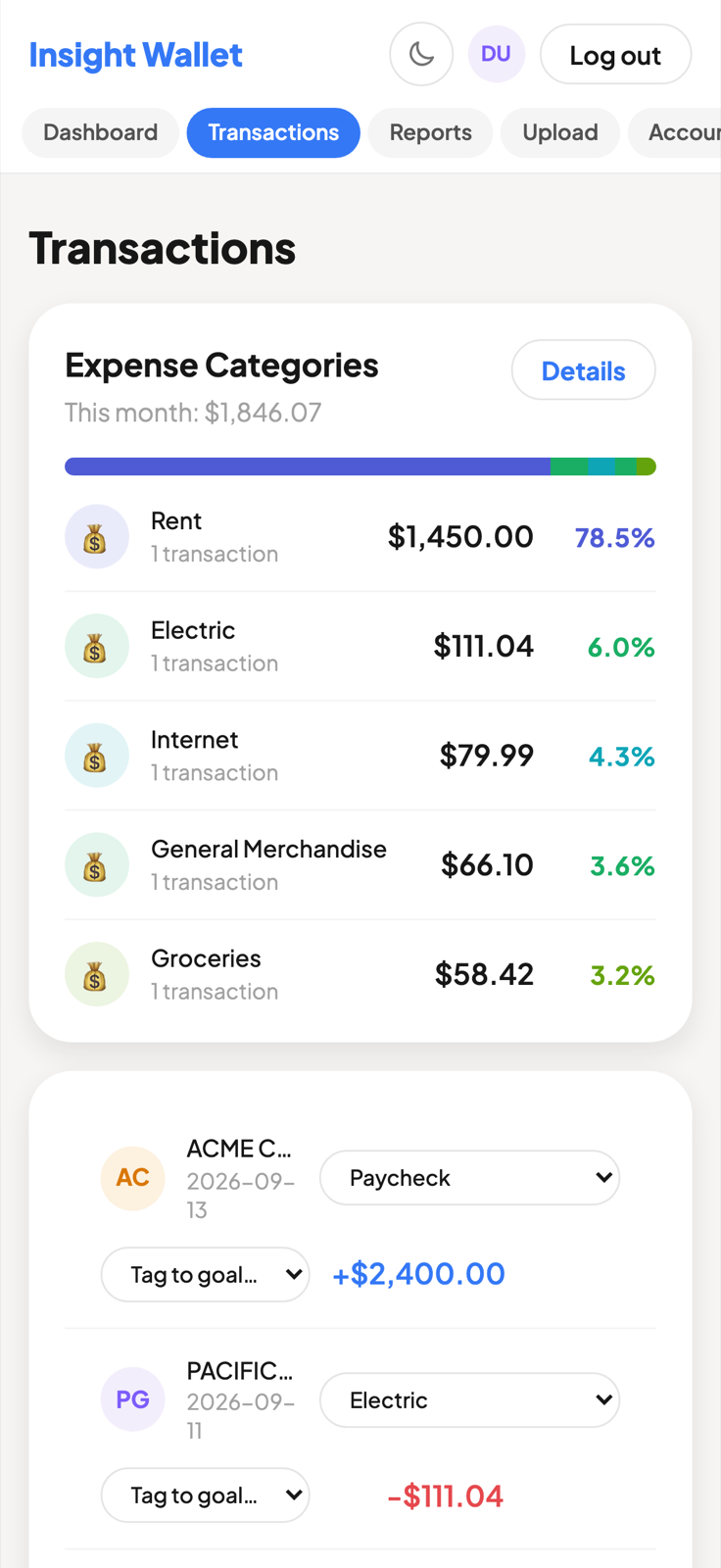
Bank descriptors are written for bank systems. A card charge reading SQ *BLUE BOTTLE #1234 becomes Blue Bottle Coffee, filed under Coffee Shops, before you ever look at it.

  • Processor prefixes and reference codes stripped
  • Rename a merchant once, applied to all of its history
  • Split a shared bill across categories
  • Tag a purchase to a savings goal
The transactions list with each row showing a cleaned-up merchant name, its category, and the amount.

On your phone

The same picture,
in your pocket.

Check a balance in the queue for coffee. Photograph a statement instead of finding a scanner.

Insight Wallet on a phone, showing the balance, a savings goal and recent transactions.
The transaction list on a phone.
Spending reports on a phone.

Plans

Start free.
Upgrade when it earns it.

Every paid plan opens with a 14-day free trial that includes one bank connection.

Starter
Track it yourself, free
$0 /month
Free, with no card
Create an account
  • Statement upload, PDF and CSV
  • Categorization that learns from you
  • Budgets, goals and reports
  • Recurring charge detection
Wealth
Plan it together
$19.99 /month
or $15.99/mo billed yearly
Start 14-day trial
  • Everything in Growth
  • Unlimited bank and card connections
  • Share with a partner, two logins, one set of books
  • AI assistant you can ask anything
  • Debt payoff planner, snowball and avalanche

The assistant · Wealth

Ask anything
about your money.

"Can I afford a vacation?" "How's my spending this month?" Answers come back grounded in your actual transactions, citing the real figures, not generic advice.

Insight Wallet is not a licensed financial adviser, and the assistant does not pretend to be one. It reads your numbers and tells you what they say.

The AI assistant screen inviting you to ask anything about your money, with example questions.

Security

Read-only by design.

Insight Wallet can see your transactions. It cannot move your money, because it never asks for the ability to.

Nothing can be moved

Bank connections request transaction history and nothing else. There is no transfer, payment or withdrawal capability anywhere in the product.

Your bank password stays yours

Connections go through Plaid, so your credentials are entered with your bank and never reach us. Access tokens are encrypted before they are stored.

Documents encrypted at rest

Statements you upload are encrypted on disk under their own key, separate from every other secret the system holds.

Two-factor, properly

Authenticator apps or SMS, with single-use recovery codes. Changing your password signs out every other device.

Brute force gets nowhere

Repeated failed sign-ins are throttled per account and per address, so a guessing attack stops long before it succeeds.

No connection required at all

The free plan never touches your bank. If you would rather hand over a PDF than a login, that path is a first-class one.

Part of the platform

One platform.
Every aspect of your financial life.

Insight Wallet is the personal surface of Insight Nexus AI — one financial graph across your personal money, your business, your tax position and your plans.

Questions

Asked before anyone signs up.

Do I have to connect my bank?

No. The free plan runs entirely on statements you upload as PDF or CSV, and everything else — categorization, budgets, goals, reports, recurring charge detection — works the same way. Connecting a bank is a convenience on paid plans, not a requirement to use the product.

Can Insight Wallet move my money?

No. Bank connections are read-only. The product requests transaction history and account balances, and it does not request, and could not use, the ability to transfer, pay or withdraw anything.

What does the free plan actually include?

Statement upload, categorization that learns from your corrections, merchant clean-up, budgets, savings goals, spending and cash-flow reports, net worth and recurring charge detection. It is a working product, not a trial that expires.

What happens when my trial ends?

Every paid plan starts with 14 days free, including one bank connection. If you do nothing, the plan you picked begins. If you cancel, you drop to the free plan and keep everything you have already imported.

Will it cancel subscriptions for me?

No, and that is deliberate. Insight Wallet finds the recurring charges in your history and shows them to you in one list. You cancel the ones you do not want, directly with the company, and you keep one hundred percent of what you save.

What is Insight Nexus AI?

It is the platform Insight Wallet belongs to — one financial graph spanning personal money, business books, tax and planning. Insight Wallet is the personal surface of it. You can read more at insightnexus.ai.

Can two people share one account?

Yes, on the Wealth plan. You invite a partner, they sign in with their own credentials, and you both see the same accounts, transactions and reports. Neither of you can change the other's password, second factor or billing.

Stop guessing where it went.
Start with one statement.

Free to begin, nothing to connect, and about four minutes before you can see the whole picture.